
TOP-10 updates in Revit 2027 in my opinion
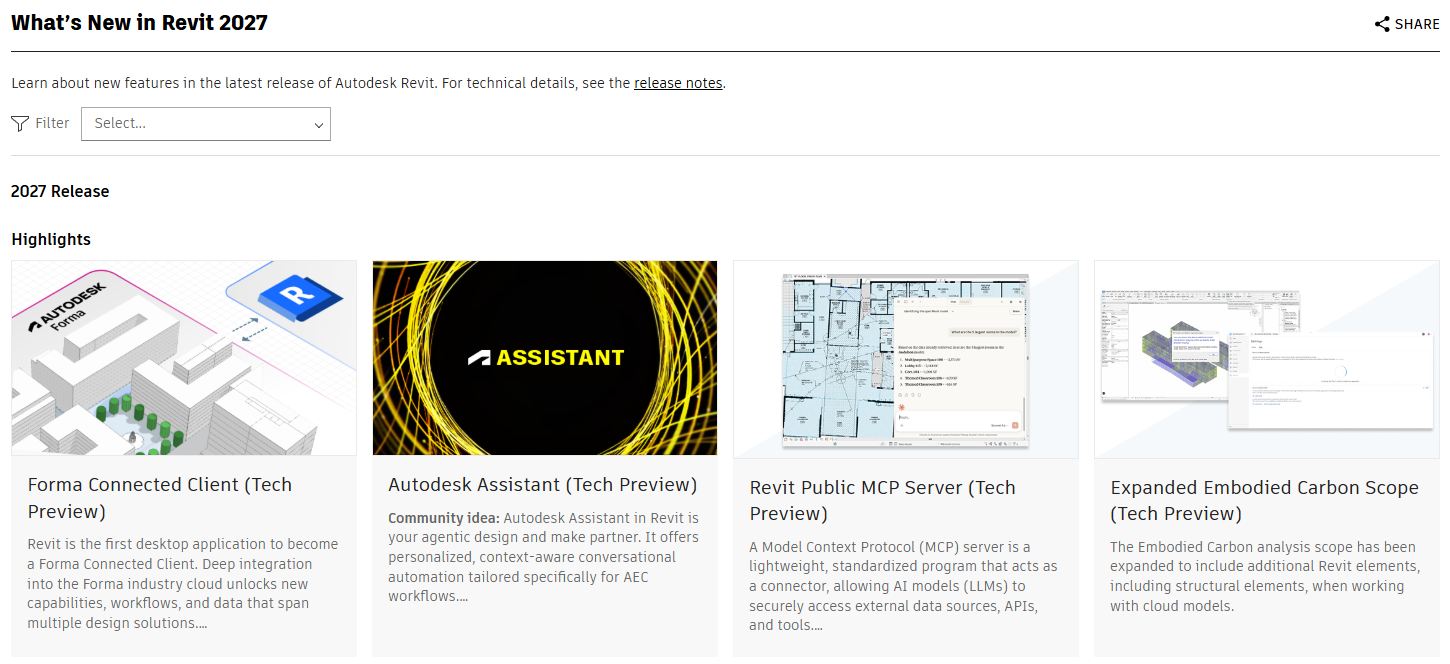
1. Autodesk Assistant – AI has officially entered Revit (and in reality, all Autodesk products)
Probably the biggest news of the 2027 release.
Revit now has its own built-in AI assistant directly inside the software. Right now it can:
- create schedules
- answer questions about the model
- make simple edits
- work with rooms / sheets / schedules
You make a change to one window — potentially you can command it to apply the same change to similar windows, for example on a selected floor.
Looks promising.
No need to expect miracles yet, because this is only the beginning. But the very fact that AI has arrived in Revit is a strong signal.
Personally, I still wouldn’t want AI making serious model changes without control. Many people on forums fear the same thing: what if it hallucinates and “changes something somewhere”? Fair point. And who is responsible then?
But for:
- checking models
- finding exceptions
- analytics
- quickly creating templates
it already looks very interesting.
2. Rule-Based Numbering – this is powerful for everyone
This is a real killer feature.
Now model elements can be renumbered according to rules:
- doors by rooms
- equipment by floors
- windows by sections
- any categories by logic
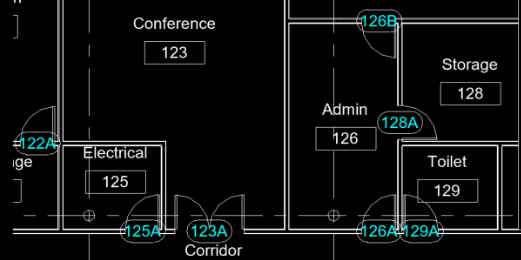
You can define:
- prefixes and suffixes
- letters
- order
- partitioning by Level / Room / parameter
- automatic updates
Anyone who manually renumbered doors on a large project will understand the pain and appreciate this feature.
This is one of those tools that saves hours not once, but constantly.
3. Integrated Issues Management – a very serious update
Basically, Autodesk has built an issues system directly into Revit.
Now you can:
- create issues directly in the model
- see tasks from other disciplines
- prioritize
- track status
- sync with Autodesk cloud environments
In practice, this is already a serious alternative to separate coordination solutions. For teamwork — top tier.
4. Wall workflow improvements
Walls received long-needed upgrades. Especially interesting:
Hosted Wall Relationships
You can create one wall dependent on another:
- cladding
- additional layer
- technical wall
- internal additions
When the main wall moves, the dependent wall moves with it. Wow. Not bad.
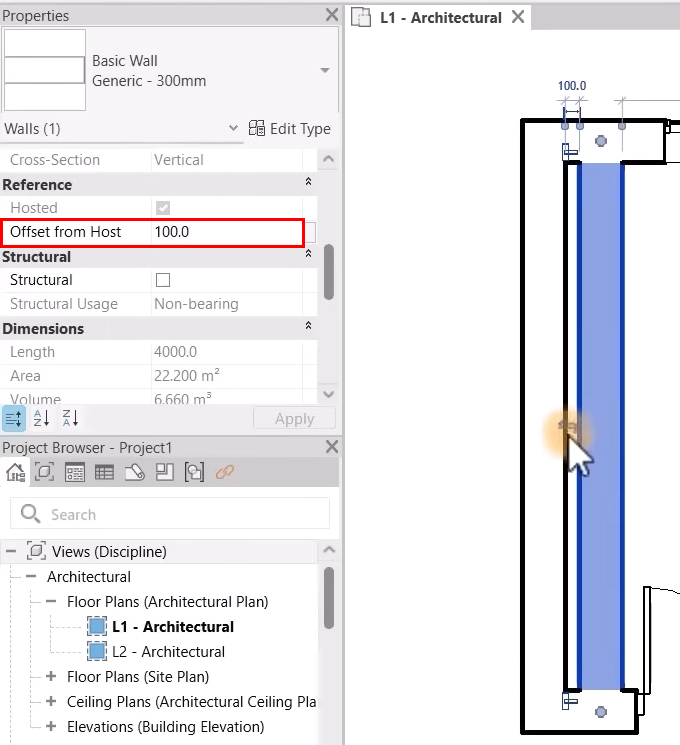
Very useful for complex multilayer wall solutions.
Also improved:
- Auto Join
- door opening behavior
- room bounding before wall creation
Though you still need to remember to move the host wall itself — not ideal, because who will constantly watch that.
5. Tag Leader Management
Finally, proper control over leader lines in tags.
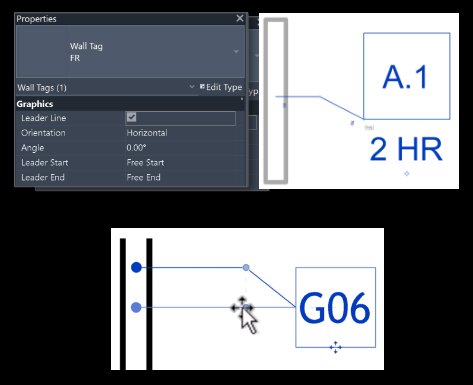
Now you can control:
- start and end of Tag Leader
- snap references
- snap behavior
- more flexible placement
Sounds minor. But for documentation this is something annoying people every day. And don’t say otherwise. This should have been done long ago, so definitely a plus.
6. Line weight control in linked models
Very needed feature. Now you can separately control line weights in linked models.
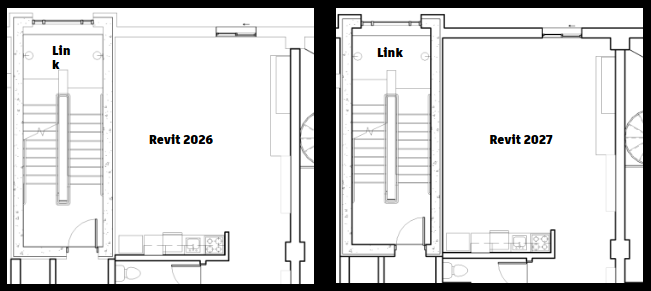
That means more control over how linked architectural / engineering / structural models appear.
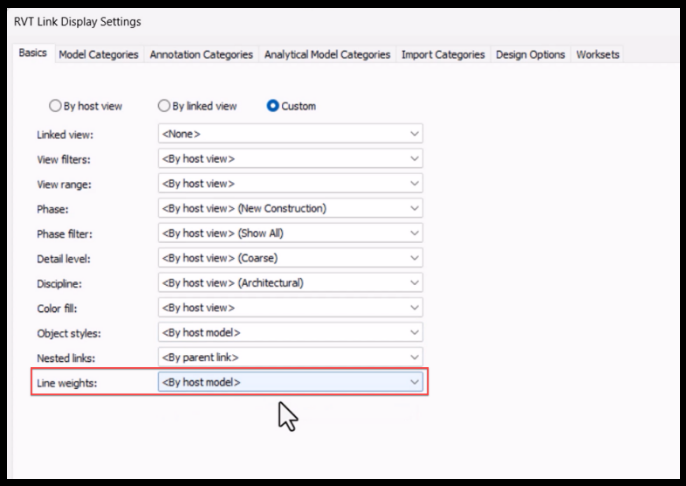
For sheet production this is genuinely important.
Because before it was often: linked model is fine, but sheet graphics look like a mess.
7. Updated IFC parameter mapping
For openBIM fans this is big news. Proper IFC mapping has been missing for a long time, and everybody knows it.
Now you can:
- create different mapping presets
- export specific Psets
- manage parameters more precisely
- import / export configs
Still needs testing. But the direction is definitely right.
8. ReCap Pro for Revit Plugin update
Especially interesting for us, because in recent years we’ve done a lot of work in Scan-to-BIM.
Autodesk is clearly continuing to invest in reality capture workflows:
- mesh classification
- IFC export
- batch processing
The world is digitizing more and more existing buildings — even cities — which means Scan-to-BIM will only keep growing. Very perspective direction. Still missing though: automatic element classification auto-modeling of basic elements like walls, slabs, etc. That would be huge. But not yet.
9. Updates for structural engineers: rebar + analytical model
For structural users, the release looks solid.
Especially:
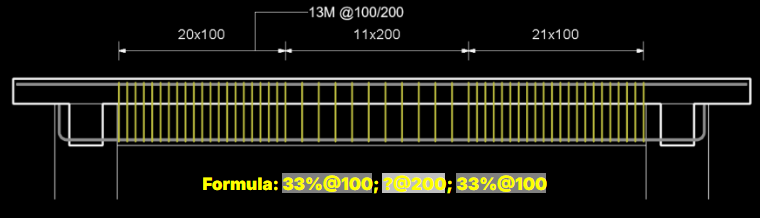
Enhanced Spacing Layout for Rebar
Formula-based reinforcement spacing.
3D Path Rebar Distribution
Rebar along complex 3D paths.
Analytical Model Automation
Automation of analytical model workflows.
For bridges, tunnels, and complex concrete forms — serious improvements.
Still, not enough perhaps. Structural engineers will have their say.
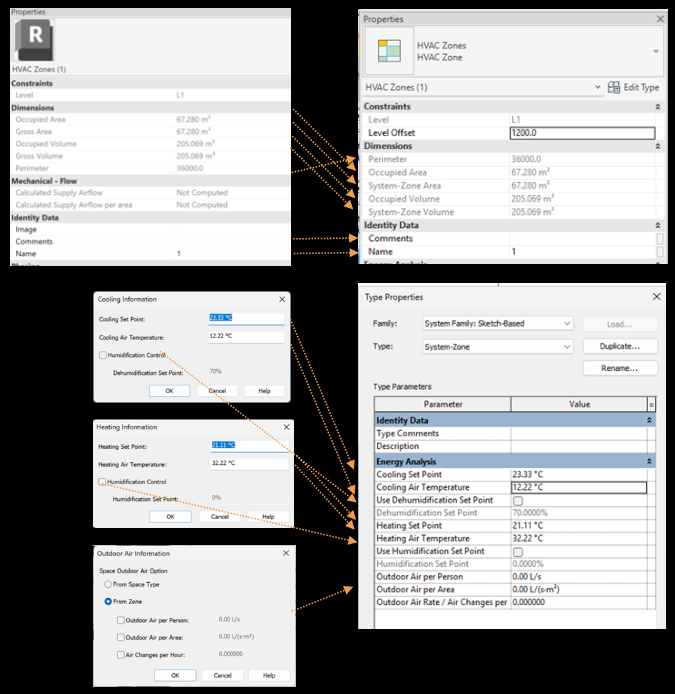
10. HVAC Zones upgraded to System-Zones
Zone logic is now closer to real systems.
But overall, for MEP this release is not revolutionary — honestly, like many recent versions. Which is unfortunate, because there are huge numbers of engineers who also need improvements, and there is definitely a lot to improve.
Also worth mentioning
Options Bar Removal
Finally, a historic era is ending. The old Option Bar is gradually being removed (it was already visible in 2025–2026 versions that this was coming), with logic moved into Ribbon + Properties.
Accelerated Graphics
Accelerated Graphics was improved.
Personally I didn’t use it much because I have decent hardware.
But for weaker PCs, very heavy models, or navigation in large projects, this may be noticeably useful.
Carbon / Sustainability
Now there is an option to fill CO2 data for materials and improvements for the Energy Model. The idea is right. But honestly, I still haven’t seen much real use of this in our practical projects. Maybe just a matter of time.
Whole list of renews on the official Autodesk website.
Final thoughts
Revit 2027 does not look like a release of something fundamentally new. It looks more like a release focused on AI direction and potential automation. Time will tell what really comes out of this version.